
$4.79+
AC | VRC Tourers - Beamer 320
VRC Tourers™ - Beamer 320™
The VRC Tourers™ - Beamer 320™ is a rear-wheel-drive touring car built to classic Super Touring specifications, focusing on mechanical precision and high-revving performance. It is powered by a 2.0L naturally aspirated inline-4 engine producing over 300 horsepower, designed for sustained high-RPM operation and sharp throttle response. Power is delivered through a 6-speed sequential gearbox, optimized for rapid and consistent gear changes.
The chassis features a front-engine, rear-wheel-drive layout with fully independent, race-spec suspension on all four corners, offering extensive adjustability for both sprint and endurance setups.
Weighing in at approximately 1,000 kg, the Beamer 320™ delivers a stable yet agile driving experience, rewarding smooth inputs and precise control across a wide range of circuits.
This mod does not represent a car raced in a particular year or season but a combination of configurations inspired by the golden years of touring car racing.
The CSP version of the car requires Custom Shaders Patch v0.2.11 Build ID 3465 or above.
© 2026 VRC Virtual Racing Cars LLC. All rights reserved. Virtual Racing Cars® is a registered trademark of VRC Virtual Racing Cars LLC. All other names, including Tourers™ and Beamer 320™, are trademarks of VRC Virtual Racing Cars LLC.
Installing a Mod for Assetto Corsa
In 2023, we developed the "EXTENDED CONTROLS" application, designed for the effortless assignment of keybindings for various additional functionalities, such as Engine Maps, Pedal Maps, Brake Migration Settings, and more, all while on the move. This app has become a standard tool used by other modding teams and is included by default in the CSP App Shelf.
To set up the "EXTENDED CONTROLS" app, follow these steps:
- Ensure CSP is up-to-date. The app is now part of the CSP App Shelf, so no manual installation is required.
- Open the in-game UI apps menu and locate the "App Shelf."
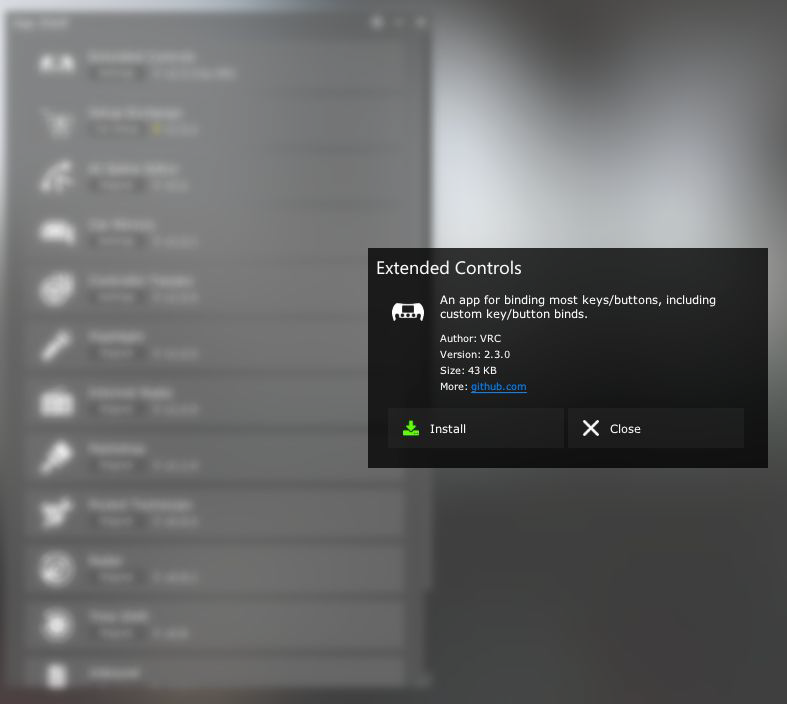
- Find VRC's Extended Controls app in the App Shelf and click on it.
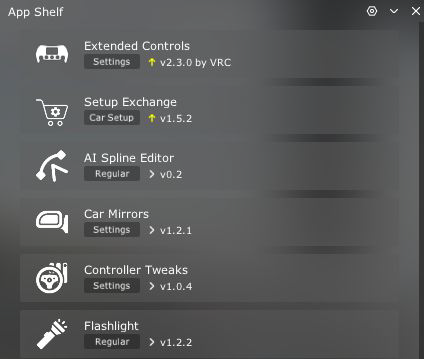
- When prompted to install the app, click "Install."
- Once installed, the Extended Controls app will appear alongside other UI apps.
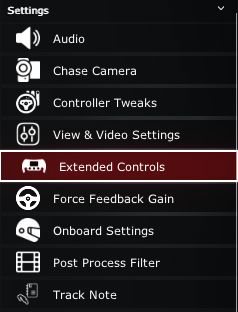
This integration ensures automatic updates, providing you with the latest features and fixes without additional effort.
V1.0.1 (2026/02/08):
- Fixed screws on the brake pedal not being correctly animated.
- Fixed reverse lights turning on without ignition.
- Small modifications to CSP lighting configs.
- Fixed livery with incorrectly spelled “Britain”.
V1.0 (2026/02/06):
- Release version.
More products



Professionally created 3D models, car physics,
sounds, textures, and tracks
for your favorite racing sim.